Start Lite: Menu for cognitive accessibility

The Start Menu in Windows 11 for older adults living with dementia

Overview

This project conceptualizes the search menu in a "cognitive accessibility mode" for Windows 11 that adapts to the cognitive decline characteristic of early-stage dementia.

Goal

To extend the autonomy of older adults living with dementia in their use of Windows 11 computers without stripping any functionality.

Team

2 designers, 1 engineer and 1 marketing manager

My role

UX Designer. Responsible for social media research, primary research, storyboarding, initial concepts, prototyping on Figma, user testing, and iteration.

The outcomes

Ranked #1 of 8 projects by judges from Microsoft.

Ranked #1 of 8 projects by judges from Microsoft.

Ranked #1 of 8 projects by judges from Microsoft.

30% reduced time-on-task, cognitive load for most tasks.

30% reduced time-on-task, cognitive load for most tasks.

30% reduced time-on-task, cognitive load for most tasks.

A scalable solution for users with cognitive impairment.

A scalable solution for users with cognitive impairment.

A scalable solution for users with cognitive impairment.

Introduction

Opportunity

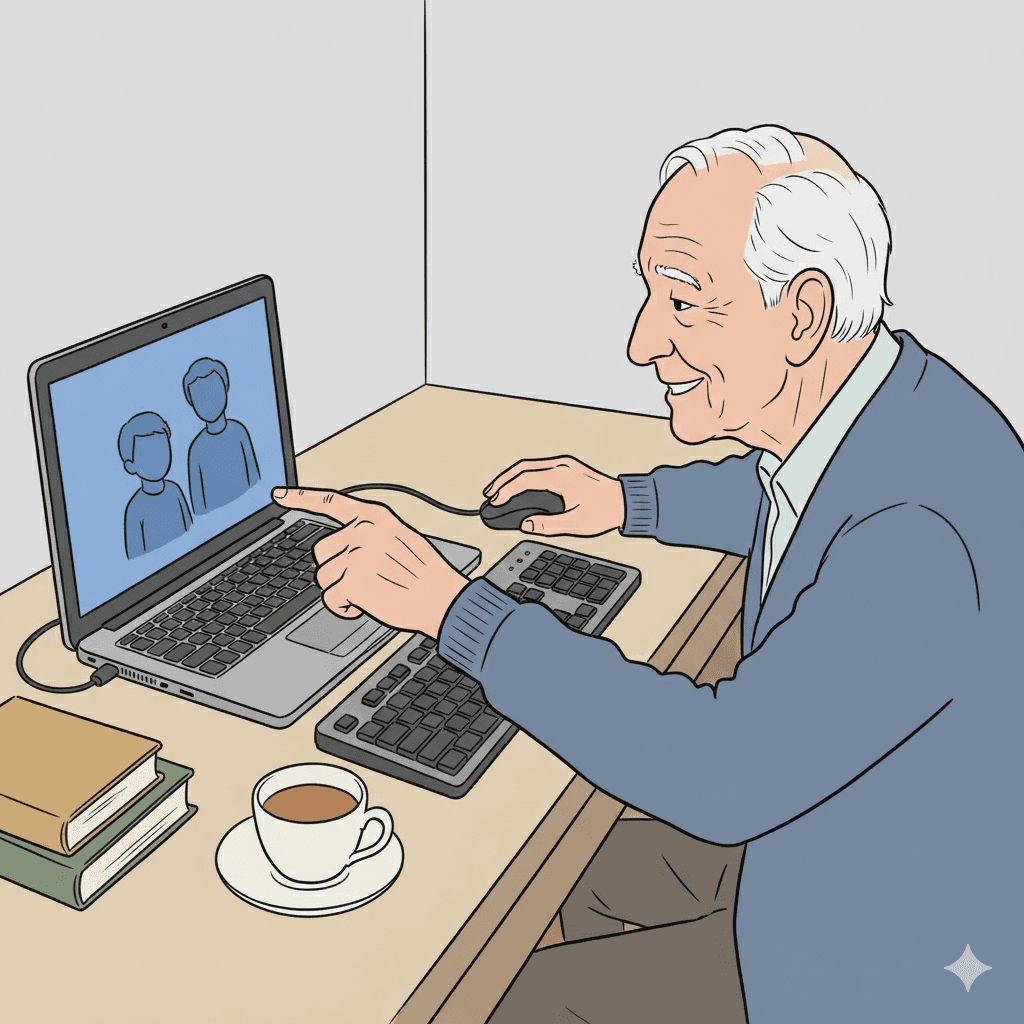
As an increasing number of older adults use technological tools for longer, the need to cater to this underserved community rises.

Older adults living with dementia experience challenges with recall, task continuity, and navigation eventually leading to anxiety and abandonment of technology.

Existing tools include purpose-built devices that lack full functionality or accessibility modes that disregard cognitive dysfunction.

This project focuses on the design of the start menu in a new "cognitive accessibility mode" for Windows 11.

Impact

In alignment with Microsoft's mission "to empower every person and every organization on the planet to achieve more", this project aims to:


  • Capture the growing market of older adults using computers.

  • Differentiate Windows 11 as the only OS bridging mainstream productivity with specialized cognitive support.

Design highlights

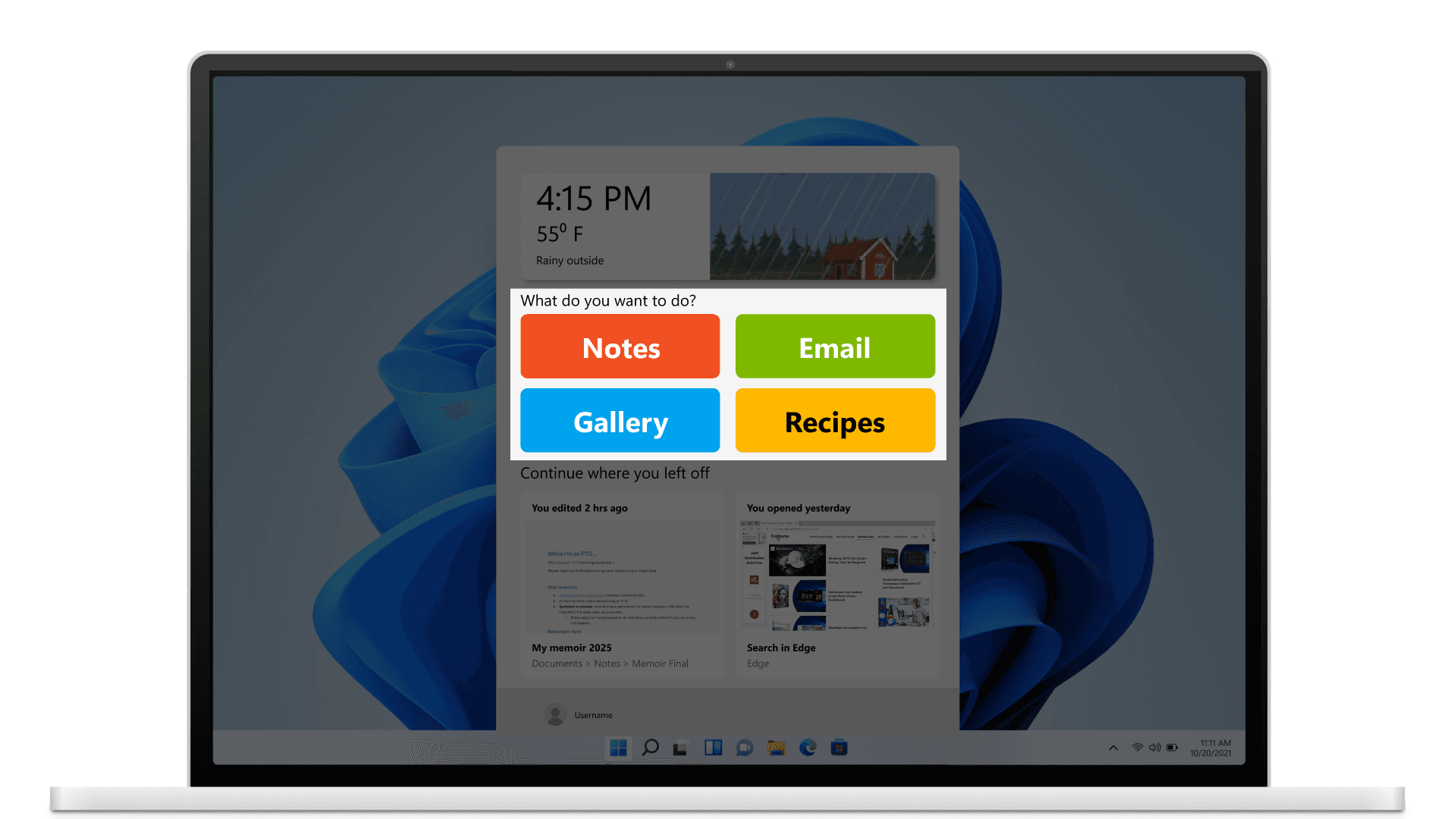
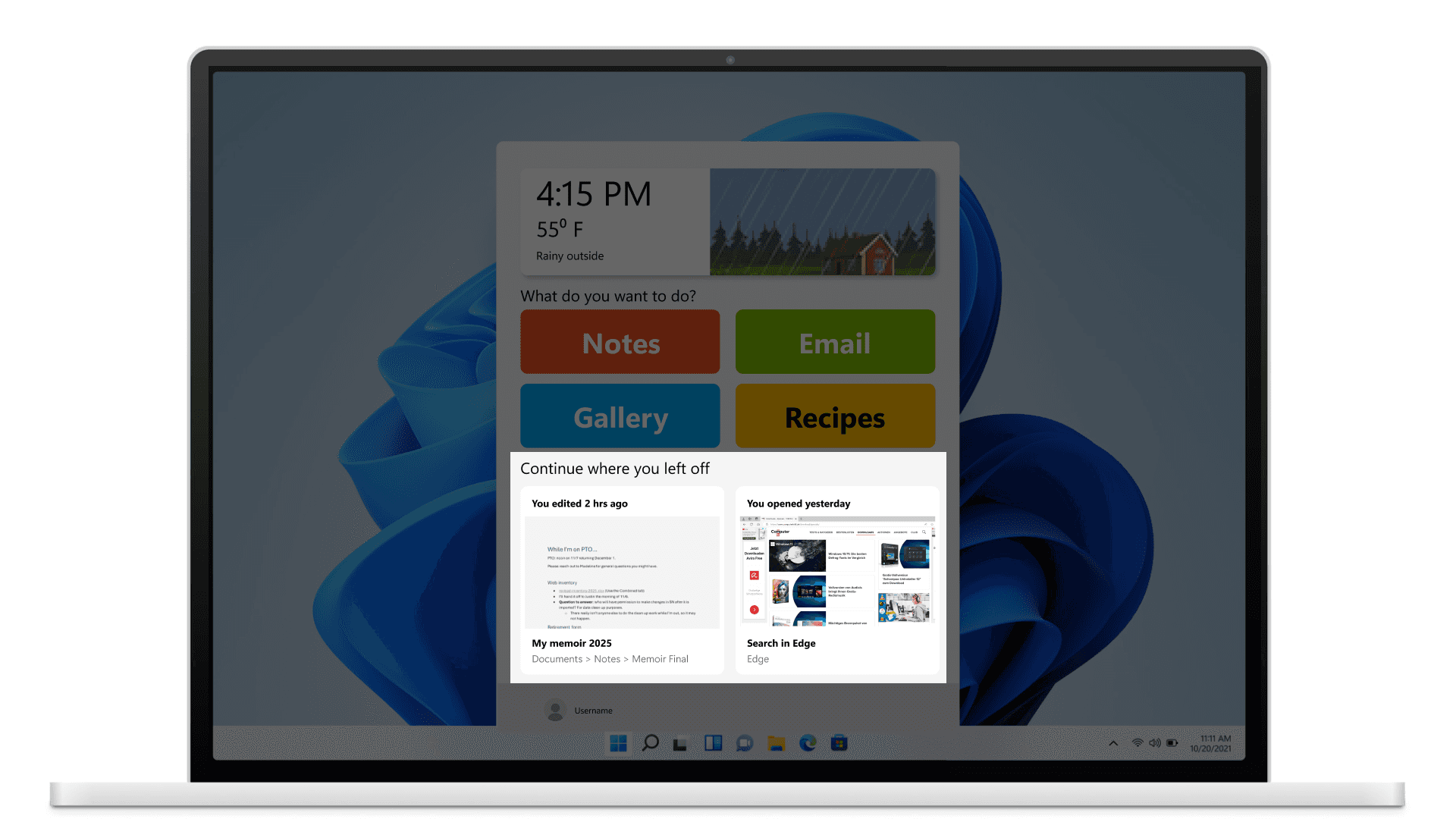
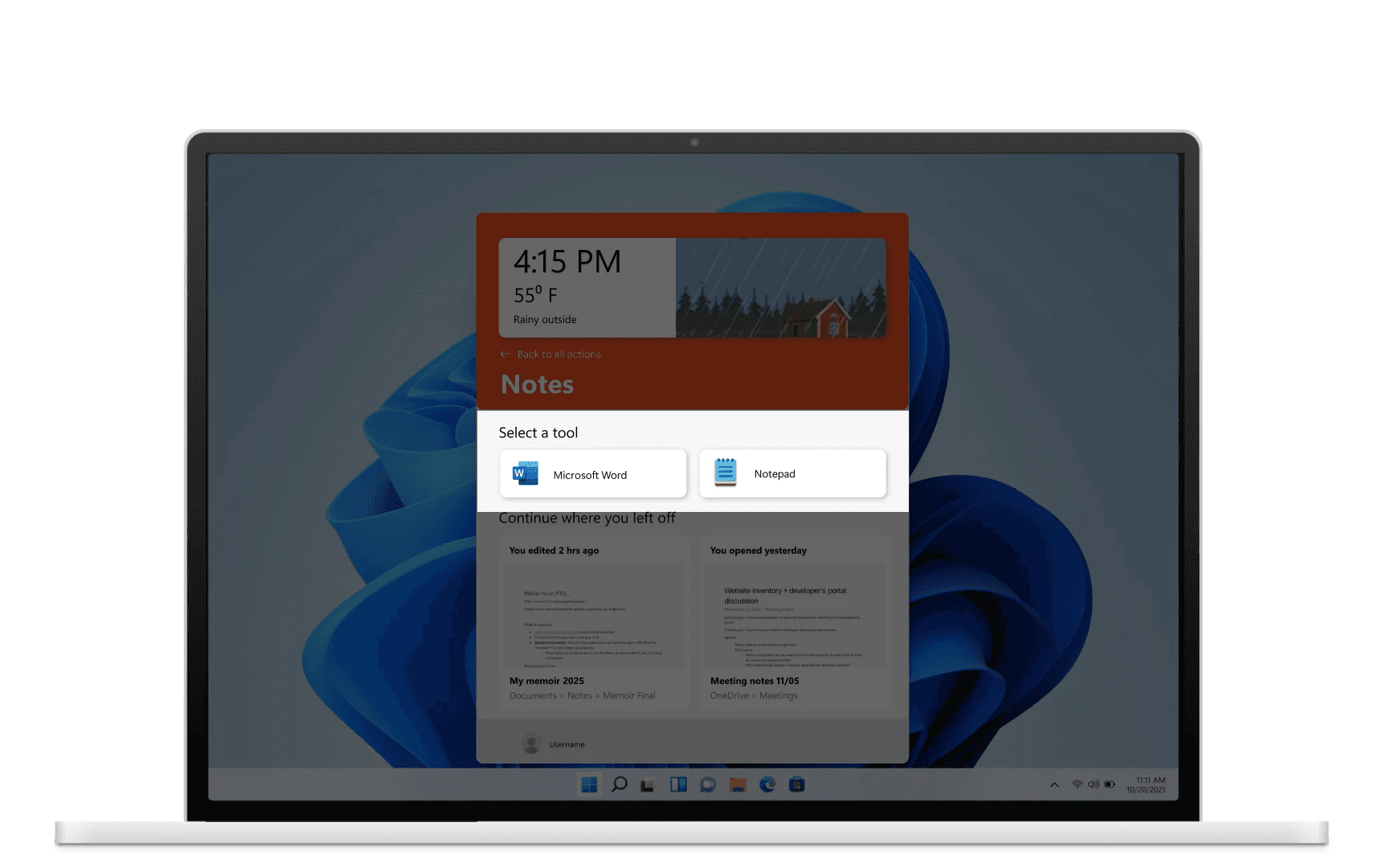
Customizable "Next Action" menu

The problem: Users know what they want to do but often fail to recall the tool name or the way to get to it.

The solution: Replacing a long list of irrelevant apps with customizable large, high-contrast tiles with familiar words: notes, email, etc. The user or their care partner can set up the most popular action items in their own words here, as well as customize the tools listed when any action item is clicked.

This makes the activity aligned to the user's mental model rather than adhering to the organization of the system's directory.

Customizable "Next Action" menu

The problem: Users know what they want to do but often fail to recall the tool name or the way to get to it.

The solution: Replacing a long list of irrelevant apps with customizable large, high-contrast tiles with familiar words: notes, email, etc. The user or their care partner can set up the most popular action items in their own words here, as well as customize the tools listed when any action item is clicked.

This makes the activity aligned to the user's mental model rather than adhering to the organization of the system's directory.

Customizable "Next Action" menu

The problem: Users know what they want to do but often fail to recall the tool name or the way to get to it.

The solution: Replacing a long list of irrelevant apps with customizable large, high-contrast tiles with familiar words: notes, email, etc. The user or their care partner can set up the most popular action items in their own words here, as well as customize the tools listed when any action item is clicked.

This makes the activity aligned to the user's mental model rather than adhering to the organization of the system's directory.

1

img
img
img

Visual continuity cards

The problem: Users often forget where they left off, where they saved their files or what they were named.

The solution: Leveraging existing interaction patterns from the Microsoft 365 ecosystem, the "Recents" section displays large previews of the last open task, including programs like browser windows with tabs. These visual cues can be added to each action item as well, making continuity intuitive.

This empowers users to resume exactly where they left off without the need for complex navigation.

Visual continuity cards

The problem: Users often forget where they left off, where they saved their files or what they were named.

The solution: Leveraging existing interaction patterns from the Microsoft 365 ecosystem, the "Recents" section displays large previews of the last open task, including programs like browser windows with tabs. These visual cues can be added to each action item as well, making continuity intuitive.

This empowers users to resume exactly where they left off without the need for complex navigation.

Visual continuity cards

The problem: Users often forget where they left off, where they saved their files or what they were named.

The solution: Leveraging existing interaction patterns from the Microsoft 365 ecosystem, the "Recents" section displays large previews of the last open task, including programs like browser windows with tabs. These visual cues can be added to each action item as well, making continuity intuitive.

This empowers users to resume exactly where they left off without the need for complex navigation.

2

The reality anchor

The problem: Users face disorientation of time and place when they spend extended periods of time on their computer.

The solution: A large, non-intrusive widget displaying time of day, temperature, and location visually.

This grounds the user in their surroundings, lowering the negative impacts associated with the use of computers.

The reality anchor

The problem: Users face disorientation of time and place when they spend extended periods of time on their computer.

The solution: A large, non-intrusive widget displaying time of day, temperature, and location visually.

This grounds the user in their surroundings, lowering the negative impacts associated with the use of computers.

The reality anchor

The problem: Users face disorientation of time and place when they spend extended periods of time on their computer.

The solution: A large, non-intrusive widget displaying time of day, temperature, and location visually.

This grounds the user in their surroundings, lowering the negative impacts associated with the use of computers.

3

Design process

+

Reddit posts analyzed

+

Immersive user research sessions

+

In-process sketches

+

Tests with target users

Discovery research: Community immersion and observations


Due to lack of access to the target user group, initially we utilized data from Reddit forum (r/dementia, r/dementiatech), analyzing hundreds of care-partner threads. This way we could identify frequently occurring pain points and makeshift solutions for using not just a computer, but any new technology (phones, smart TVs, etc.)

“...To try to mitigate this, the family has printed out and laminated several 8.5" x 11 "flash cards" in huge, bold font and attached them to the side of the desk on a metal ring…”
-Reddit user on r/dementia

Interviewing subject-matter experts in aging studies and technology for the elderly pushed us to involve members of the community in design-decision making.

“Reducing the number of options when there are choices to be made... because they can’t keep in mind everything they see...”
-Subject-matter expert
on strategies to design for people living with dementia

So we immersed ourselves in a local community for older adults, attending weekly gatherings to observe older adults in their comfort zone and to understand the culture surrounding dementia support. Through this immersion, we discovered the tension between needing help and wanting independence, shifting our strategy from explicit guidance to scaffolded journey.

“Sometimes he admits he needs help and other times he struggles and struggles and finally I have to intervene…”
-Care partner in an interview

Discovery research: Community immersion and observations


Due to lack of access to the target user group, initially we utilized data from Reddit forum (r/dementia, r/dementiatech), analyzing hundreds of care-partner threads. This way we could identify frequently occurring pain points and makeshift solutions for using not just a computer, but any new technology (phones, smart TVs, etc.)

“...To try to mitigate this, the family has printed out and laminated several 8.5" x 11 "flash cards" in huge, bold font and attached them to the side of the desk on a metal ring…”
-Reddit user on r/dementia

Interviewing subject-matter experts in aging studies and technology for the elderly pushed us to involve members of the community in design-decision making.

“Reducing the number of options when there are choices to be made... because they can’t keep in mind everything they see...”
-Subject-matter expert
on strategies to design for people living with dementia

So we immersed ourselves in a local community for older adults, attending weekly gatherings to observe older adults in their comfort zone and to understand the culture surrounding dementia support. Through this immersion, we discovered the tension between needing help and wanting independence, shifting our strategy from explicit guidance to scaffolded journey.

“Sometimes he admits he needs help and other times he struggles and struggles and finally I have to intervene…”
-Care partner in an interview

Discovery research: Community immersion and observations


Due to lack of access to the target user group, initially we utilized data from Reddit forum (r/dementia, r/dementiatech), analyzing hundreds of care-partner threads. This way we could identify frequently occurring pain points and makeshift solutions for using not just a computer, but any new technology (phones, smart TVs, etc.)

“...To try to mitigate this, the family has printed out and laminated several 8.5" x 11 "flash cards" in huge, bold font and attached them to the side of the desk on a metal ring…”
-Reddit user on r/dementia

Interviewing subject-matter experts in aging studies and technology for the elderly pushed us to involve members of the community in design-decision making.

“Reducing the number of options when there are choices to be made... because they can’t keep in mind everything they see...”
-Subject-matter expert
on strategies to design for people living with dementia

So we immersed ourselves in a local community for older adults, attending weekly gatherings to observe older adults in their comfort zone and to understand the culture surrounding dementia support. Through this immersion, we discovered the tension between needing help and wanting independence, shifting our strategy from explicit guidance to scaffolded journey.

“Sometimes he admits he needs help and other times he struggles and struggles and finally I have to intervene…”
-Care partner in an interview

Design decision: Emphasizing on the start menu


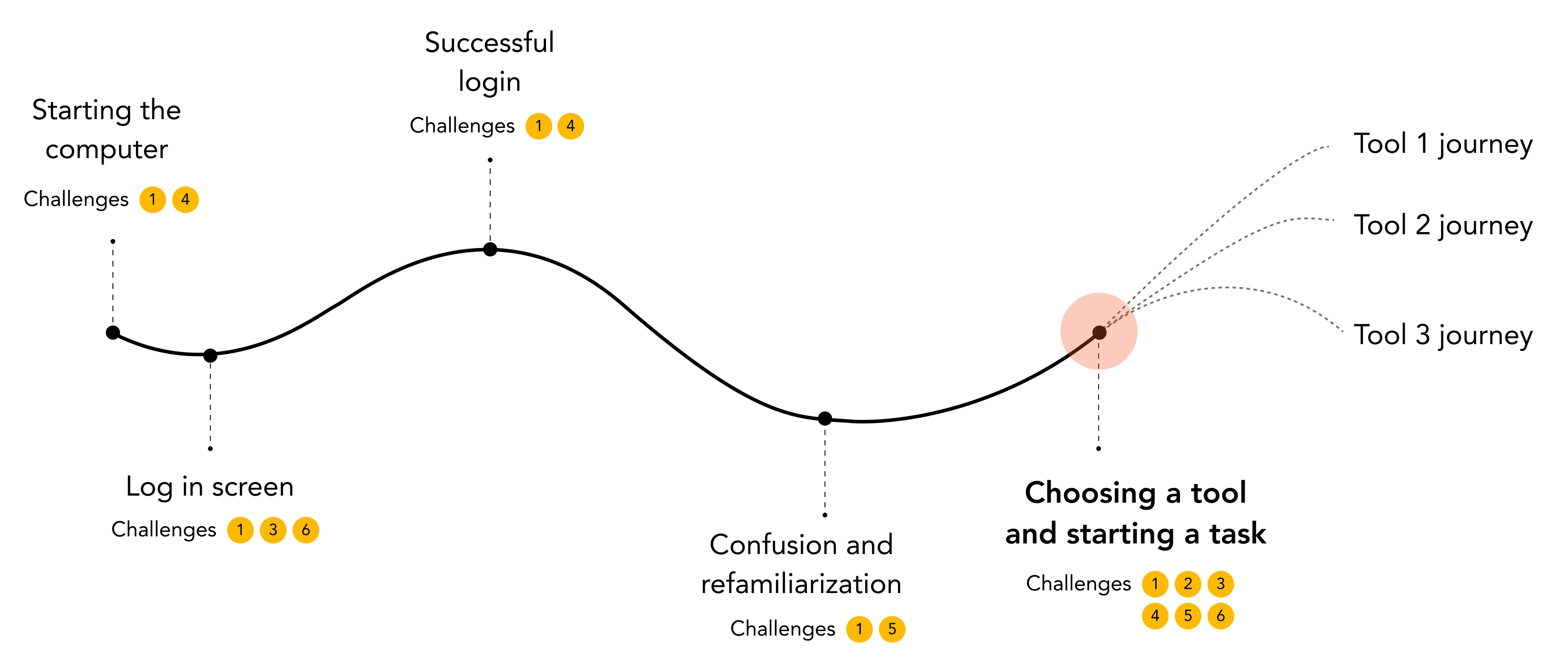
Through discovery research, we identified 6 major challenges older adults with dementia face when they use their laptop or computer.

  1. Need for memory aids

  2. Overwhelm due to too much information

  3. Confusion due to difficulty recalling and finding tools or files

  4. Desire to balance independence and help

  5. Disorientation of time and place

  6. Fear of "breaking" something

For the highest impact, we choose to direct our efforts to the part of the journey of using a computer that was affected by most challenges.

Design decision: Emphasizing on the start menu


Through discovery research, we identified 6 major challenges older adults with dementia face when they use their laptop or computer.

  1. Need for memory aids

  2. Overwhelm due to too much information

  3. Confusion due to difficulty recalling and finding tools or files

  4. Desire to balance independence and help

  5. Disorientation of time and place

  6. Fear of "breaking" something

For the highest impact, we choose to direct our efforts to the part of the journey of using a computer that was affected by most challenges.

Design decision: Emphasizing on the start menu


Through discovery research, we identified 6 major challenges older adults with dementia face when they use their laptop or computer.

  1. Need for memory aids

  2. Overwhelm due to too much information

  3. Confusion due to difficulty recalling and finding tools or files

  4. Desire to balance independence and help

  5. Disorientation of time and place

  6. Fear of "breaking" something

For the highest impact, we choose to direct our efforts to the part of the journey of using a computer that was affected by most challenges.

Rapid prototyping and guerrilla testing


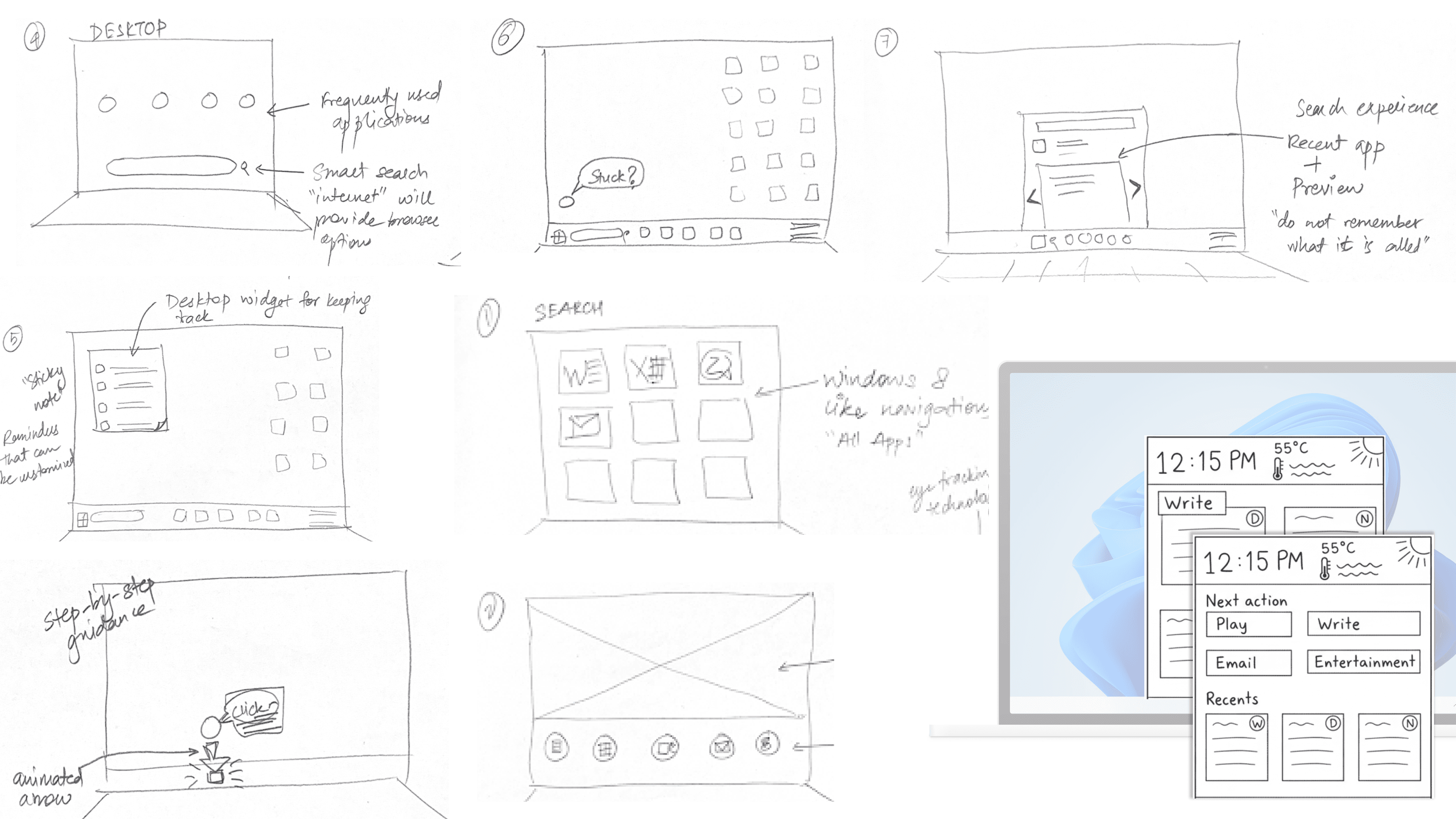
Instead of high-fidelity polished prototypes, we tested using hand-drawn sketches and storyboards with subject-matter experts and people in our studio. For testing with laypeople we judged the success of our concepts on the basis of the amount of guidance or further scaffolding required.

The rough sketches invited honest feedback rather than critiques on pixel-perfect details, validating our core "Next Action" concept early.

We then followed this by testing refined concepts with older adults living with dementia to validate ideas and further refine the design.

Rapid prototyping and guerrilla testing


Instead of high-fidelity polished prototypes, we tested using hand-drawn sketches and storyboards with subject-matter experts and people in our studio. For testing with laypeople we judged the success of our concepts on the basis of the amount of guidance or further scaffolding required.

The rough sketches invited honest feedback rather than critiques on pixel-perfect details, validating our core "Next Action" concept early.

We then followed this by testing refined concepts with older adults living with dementia to validate ideas and further refine the design.

Rapid prototyping and guerrilla testing


Instead of high-fidelity polished prototypes, we tested using hand-drawn sketches and storyboards with subject-matter experts and people in our studio. For testing with laypeople we judged the success of our concepts on the basis of the amount of guidance or further scaffolding required.

The rough sketches invited honest feedback rather than critiques on pixel-perfect details, validating our core "Next Action" concept early.

We then followed this by testing refined concepts with older adults living with dementia to validate ideas and further refine the design.

Design decision: Simplification rather than feature addition


We intentionally deprioritized new features (such as voice control, new interfaces) in favor of simplification. The decision was based on results from discovery research and testing, which revealed that change and more information would be harmful rather than helpful for the target audience. Instead, we leveraged familiar interaction patterns to craft an opt-in simplified experience which would be highly customizable.

The intent was to hide 90% of Windows' complexity to surface only the 10% of features that drove meaning and connection. Keeping in mind the role that care partners play, we decided to systematically distribute the responsibility of building customizations to them.

Design decision: Simplification rather than feature addition


We intentionally deprioritized new features (such as voice control, new interfaces) in favor of simplification. The decision was based on results from discovery research and testing, which revealed that change and more information would be harmful rather than helpful for the target audience. Instead, we leveraged familiar interaction patterns to craft an opt-in simplified experience which would be highly customizable.

The intent was to hide 90% of Windows' complexity to surface only the 10% of features that drove meaning and connection. Keeping in mind the role that care partners play, we decided to systematically distribute the responsibility of building customizations to them.

Design decision: Simplification rather than feature addition


We intentionally deprioritized new features (such as voice control, new interfaces) in favor of simplification. The decision was based on results from discovery research and testing, which revealed that change and more information would be harmful rather than helpful for the target audience. Instead, we leveraged familiar interaction patterns to craft an opt-in simplified experience which would be highly customizable.

The intent was to hide 90% of Windows' complexity to surface only the 10% of features that drove meaning and connection. Keeping in mind the role that care partners play, we decided to systematically distribute the responsibility of building customizations to them.

Reflection

Through this project I learned to navigate ethical research barriers. We couldn't easily interview dementia patients directly due to vulnerability, so relying on "proxy" research via care partners and SMEs taught me how to synthesize second-hand data without losing empathy. Further, working on an established product, Windows 11 which is interdependent with other systems, I learned how to leverage existing data (from tools such as Recall, or from existing Recents) and interaction patterns. This helped create a project that would be scalable and a minimal-effort endeavor, if it were to be executed.

Wins:

  1. Identifying care partners as a stakeholder early-on.

  2. Starting the conversation about cognitive accessibility and what it could entail. The perfect example of less is more, through this project we reduced information and decision density rather than adding more.

  3. Successfully leveraged existing interaction patterns within Microsoft.

Limitations:

  1. This redesigned start experience is only good until cognitive health persists. We did not delve into opportunities for supporting memory therapy.

  2. We only explored interaction patterns for efficiency, descoping affective components. Some suggestions to integrate family history visually were received from subject-matter experts during testing.

  3. We shaped the project despite infrequent access to the target user group, but we could've benefited from more engaged interactions with them.

Through this project I learned to navigate ethical research barriers. We couldn't easily interview dementia patients directly due to vulnerability, so relying on "proxy" research via care partners and SMEs taught me how to synthesize second-hand data without losing empathy. Further, working on an established product, Windows 11 which is interdependent with other systems, I learned how to leverage existing data (from tools such as Recall, or from existing Recents) and interaction patterns. This helped create a project that would be scalable and a minimal-effort endeavor, if it were to be executed.

Wins:

  1. Identifying care partners as a stakeholder early-on.

  2. Starting the conversation about cognitive accessibility and what it could entail. The perfect example of less is more, through this project we reduced information and decision density rather than adding more.

  3. Successfully leveraged existing interaction patterns within Microsoft.

Limitations:

  1. This redesigned start experience is only good until cognitive health persists. We did not delve into opportunities for supporting memory therapy.

  2. We only explored interaction patterns for efficiency, descoping affective components. Some suggestions to integrate family history visually were received from subject-matter experts during testing.

  3. We shaped the project despite infrequent access to the target user group, but we could've benefited from more engaged interactions with them.

Through this project I learned to navigate ethical research barriers. We couldn't easily interview dementia patients directly due to vulnerability, so relying on "proxy" research via care partners and SMEs taught me how to synthesize second-hand data without losing empathy. Further, working on an established product, Windows 11 which is interdependent with other systems, I learned how to leverage existing data (from tools such as Recall, or from existing Recents) and interaction patterns. This helped create a project that would be scalable and a minimal-effort endeavor, if it were to be executed.

Wins:

  1. Identifying care partners as a stakeholder early-on.

  2. Starting the conversation about cognitive accessibility and what it could entail. The perfect example of less is more, through this project we reduced information and decision density rather than adding more.

  3. Successfully leveraged existing interaction patterns within Microsoft.

Limitations:

  1. This redesigned start experience is only good until cognitive health persists. We did not delve into opportunities for supporting memory therapy.

  2. We only explored interaction patterns for efficiency, descoping affective components. Some suggestions to integrate family history visually were received from subject-matter experts during testing.

  3. We shaped the project despite infrequent access to the target user group, but we could've benefited from more engaged interactions with them.

Available for full-time opportunities starting May '26

Let's Connect!

Happy to talk about all things design!

Logo

Available for full-time opportunities starting May '26

Let's Connect!

Happy to talk about all things design!

Logo

Available for full-time opportunities starting May '26

Let's Connect!

Happy to talk about all things design!

Logo

Create a free website with Framer, the website builder loved by startups, designers and agencies.