Fin: A sales chatbot for the Salesforce website
A context-aware chatbot to bridge the gap between discovery and conversion

Overview
We designed Fin, a context-aware, GenAI-powered chatbot for new customers visiting the Salesforce website. Fin guides users through product discovery using a personalized, human-like experience while balancing the business need of driving sales. From behavioral triggers to proactive help, Fin keeps the sales journey smooth, smart, and stress-free.
Goal
Design interaction patterns for a chatbot that guides customers through a customized product discovery process on the Salesforce website.
Team
9 UX Designers, 1 Salesforce designer & 1 Salesforce researcher (mentors)
My role
UX Designer. Responsible for contextual inquiries, initial ideation, sketching, and prototyping.


The outcomes

>40% reduction in browsing effort, empowering informed decision-making.

Enhanced product discoverability and conversion.

65% increase in engagement. Users reported feeling more "comfortable" and "heard,"
Introduction


Opportunity
Salesforce challenged us to create a chatbot that welcomes new explorers, helps them discover products with ease, and seamlessly guides them to sales conversations at the right moment.
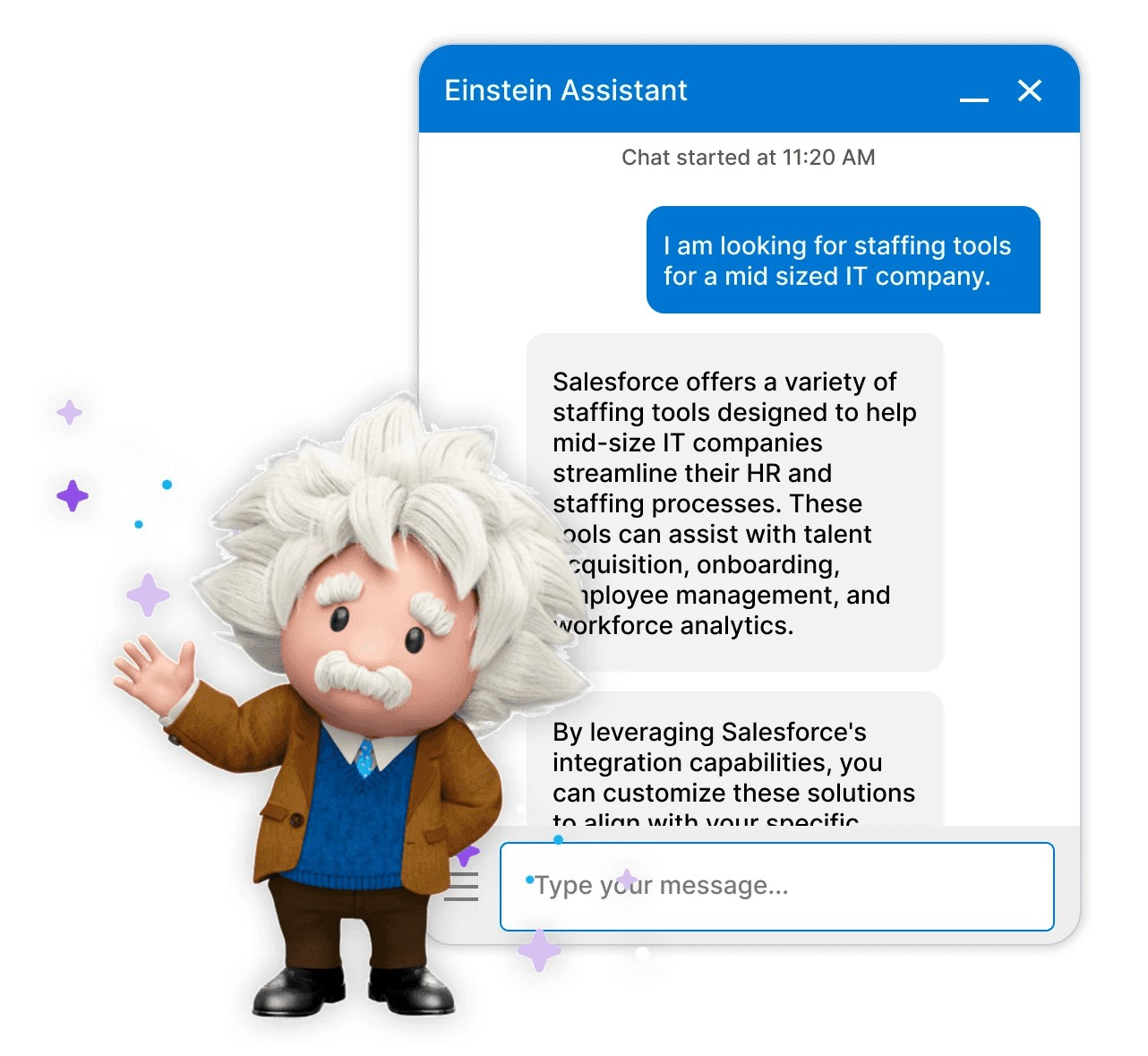
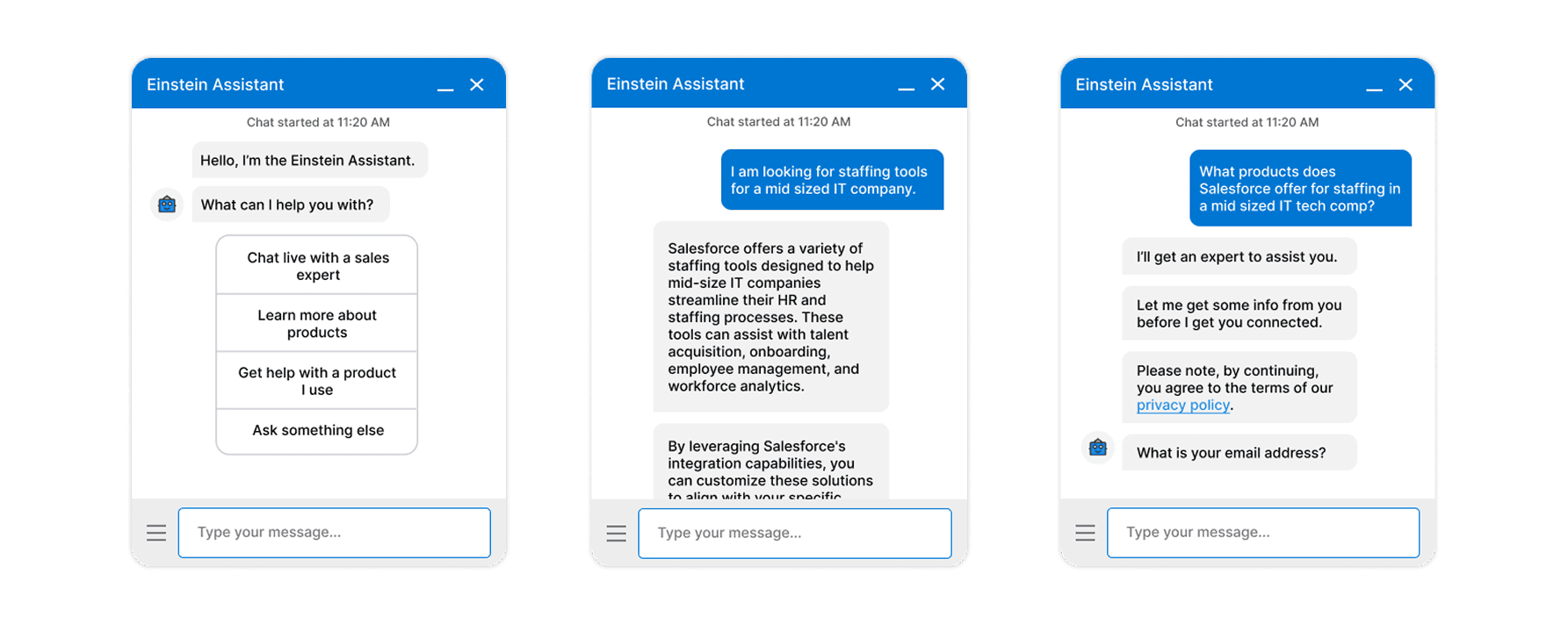
Transitioning from a robotic, rule-based chatbot to a Generative AI experience allowed us to solve user frustrations like endless scrolling and generic, repetitive responses. This shift enables empathetic responses and highly personalized product recommendations.
Impact
Reduced Friction: Behavioral triggers identify user hesitation (like backspacing or inactivity) to offer immediate, relevant help.
Enhanced Discovery: Users can compare products and track their journey via a visual timeline, reducing the cognitive load of recalling information.
Increased Engagement: A human-like tone fosters trust, making new users more comfortable exploring complex SaaS solutions.
Design highlights


Behavioral Triggers & Adaptive Support
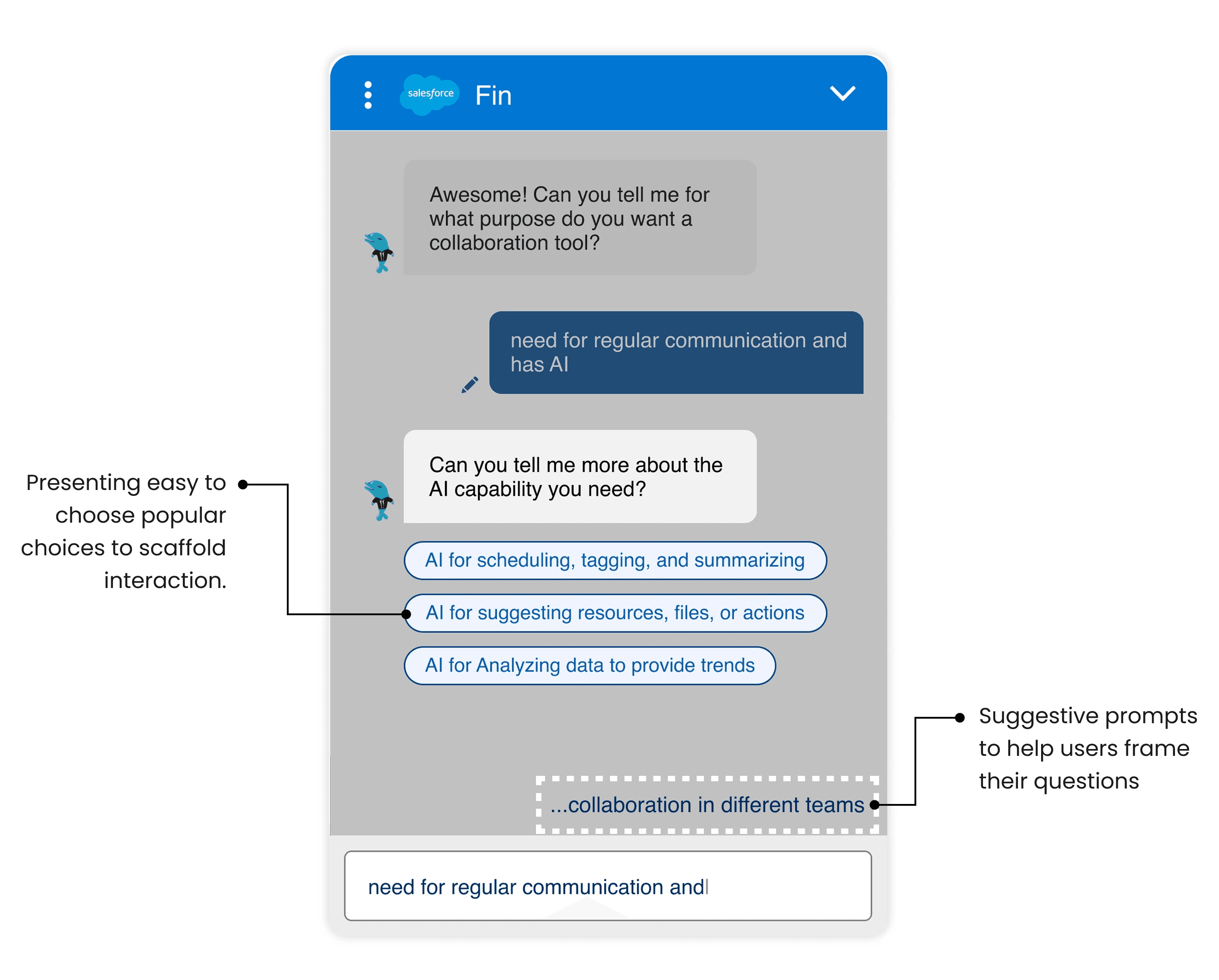
The problem: Users often get stuck or feel frustrated when a chatbot doesn't understand vague entries or when they are unsure how to proceed.
The solution: We implemented triggers for inactivity and repeated reframing. If a user hesitates, Fin nudges them with a helpful question, ensuring the conversation stays on track without being overbearing.
Behavioral Triggers & Adaptive Support
The problem: Users often get stuck or feel frustrated when a chatbot doesn't understand vague entries or when they are unsure how to proceed.
The solution: We implemented triggers for inactivity and repeated reframing. If a user hesitates, Fin nudges them with a helpful question, ensuring the conversation stays on track without being overbearing.
Behavioral Triggers & Adaptive Support
The problem: Users often get stuck or feel frustrated when a chatbot doesn't understand vague entries or when they are unsure how to proceed.
The solution: We implemented triggers for inactivity and repeated reframing. If a user hesitates, Fin nudges them with a helpful question, ensuring the conversation stays on track without being overbearing.
1


Context-Aware Product Comparison
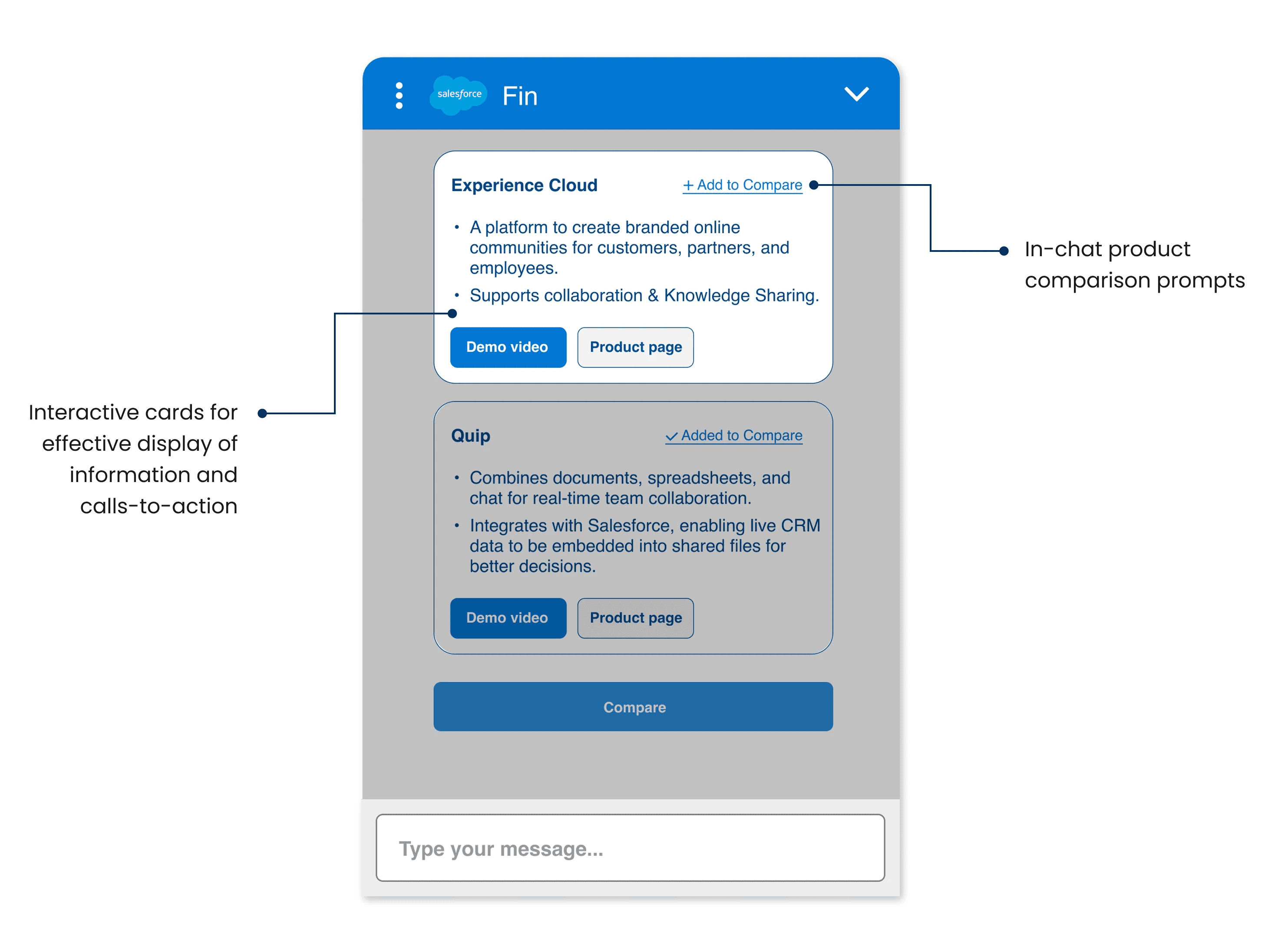
The problem: In traditional chats, users must scroll through long histories to recall product details, leading to "tired reading" and site abandonment.
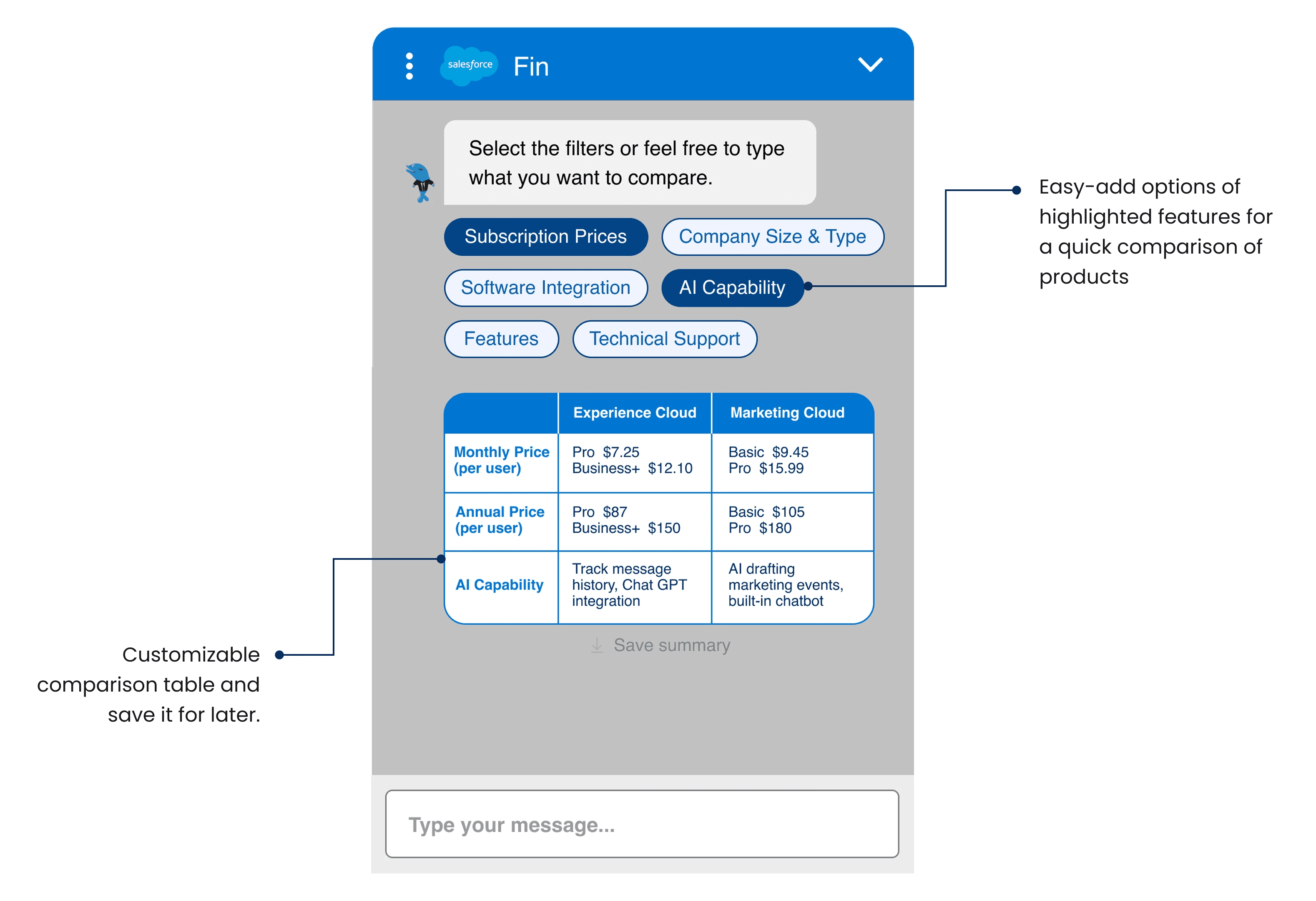
The solution: A dedicated comparison feature and bookmarking system allow users to see features, pricing, and integrations side-by-side. This keeps all critical decision-making data in one view.
Context-Aware Product Comparison
The problem: In traditional chats, users must scroll through long histories to recall product details, leading to "tired reading" and site abandonment.
The solution: A dedicated comparison feature and bookmarking system allow users to see features, pricing, and integrations side-by-side. This keeps all critical decision-making data in one view.
Context-Aware Product Comparison
The problem: In traditional chats, users must scroll through long histories to recall product details, leading to "tired reading" and site abandonment.
The solution: A dedicated comparison feature and bookmarking system allow users to see features, pricing, and integrations side-by-side. This keeps all critical decision-making data in one view.
2


Empathetic & Proactive "Dolphin" Persona
The problem: The original Einstein Assistant felt robotic, used repetitive phrases, and lacked a human-like tone, causing users to refrain from engaging conversationally or to abandon the chat in favor of a sales call prematurely.
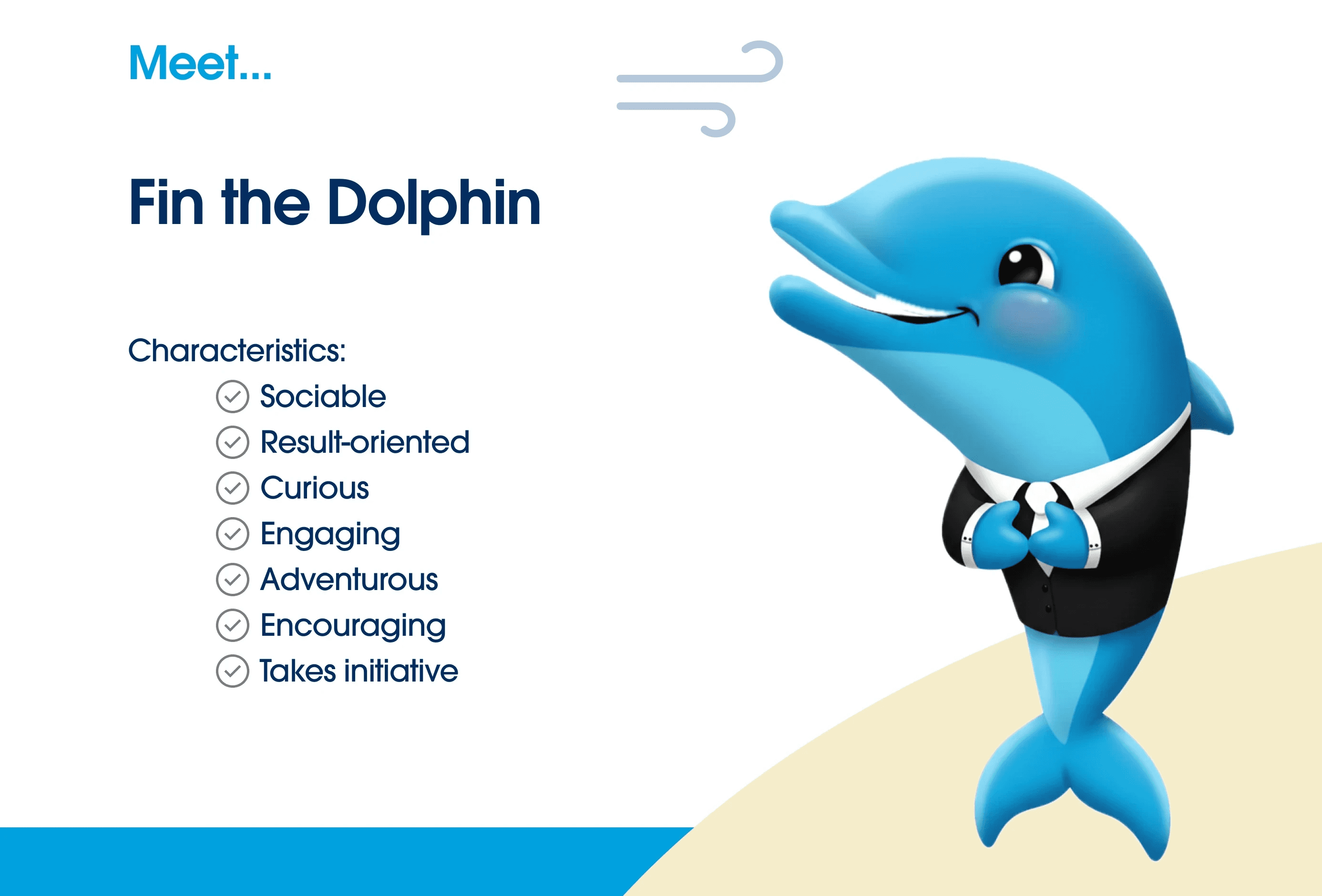
The solution: We developed a "Dolphin" persona—intelligent, social, and helpful—that uses empathetic, human-centric language. We replaced rigid "I don’t understand" errors with supportive responses like, "Need help finding the perfect fit? Let me connect you with a product expert!". This shifts the chatbot from a cold automated tool into a trusted, approachable guide that encourages deeper user inquiry.
Empathetic & Proactive "Dolphin" Persona
The problem: The original Einstein Assistant felt robotic, used repetitive phrases, and lacked a human-like tone, causing users to refrain from engaging conversationally or to abandon the chat in favor of a sales call prematurely.
The solution: We developed a "Dolphin" persona—intelligent, social, and helpful—that uses empathetic, human-centric language. We replaced rigid "I don’t understand" errors with supportive responses like, "Need help finding the perfect fit? Let me connect you with a product expert!". This shifts the chatbot from a cold automated tool into a trusted, approachable guide that encourages deeper user inquiry.
Empathetic & Proactive "Dolphin" Persona
The problem: The original Einstein Assistant felt robotic, used repetitive phrases, and lacked a human-like tone, causing users to refrain from engaging conversationally or to abandon the chat in favor of a sales call prematurely.
The solution: We developed a "Dolphin" persona—intelligent, social, and helpful—that uses empathetic, human-centric language. We replaced rigid "I don’t understand" errors with supportive responses like, "Need help finding the perfect fit? Let me connect you with a product expert!". This shifts the chatbot from a cold automated tool into a trusted, approachable guide that encourages deeper user inquiry.
3
Design process
+
Contextual Inquiries as discovery research
+
Competitor Analysis for benchmarking
+
Rounds of Iteration and Prototyping
+
Cognitive Walkthroughs for testing
Contextual Inquiries using popular LLMs
This unconventional inquiry allowed us to map the "psychology of the sale"—identifying that user abandonment was often driven by the anxiety of being forced into a sales funnel too early. By observing users interact with existing "robotic" bots, we identified that the primary friction point wasn't lack of information, but a lack of conversational trust.
Contextual Inquiries using popular LLMs
This unconventional inquiry allowed us to map the "psychology of the sale"—identifying that user abandonment was often driven by the anxiety of being forced into a sales funnel too early. By observing users interact with existing "robotic" bots, we identified that the primary friction point wasn't lack of information, but a lack of conversational trust.
Contextual Inquiries using popular LLMs
This unconventional inquiry allowed us to map the "psychology of the sale"—identifying that user abandonment was often driven by the anxiety of being forced into a sales funnel too early. By observing users interact with existing "robotic" bots, we identified that the primary friction point wasn't lack of information, but a lack of conversational trust.
Defining Novel Interaction Patterns
At a time when most chatbots were reactive and linear, we pioneered "Behavioral Triggers"—predictive interaction patterns that detect user hesitation, such as long pauses or repeated backspacing. We introduced spatial features like the visual conversation timeline and dynamic, in-chat product comparison tables. These patterns were revolutionary in the chatbot space, transforming the interface from a simple messaging bubble into a persistent workspace that assists with complex decision-making.
Defining Novel Interaction Patterns
At a time when most chatbots were reactive and linear, we pioneered "Behavioral Triggers"—predictive interaction patterns that detect user hesitation, such as long pauses or repeated backspacing. We introduced spatial features like the visual conversation timeline and dynamic, in-chat product comparison tables. These patterns were revolutionary in the chatbot space, transforming the interface from a simple messaging bubble into a persistent workspace that assists with complex decision-making.
Defining Novel Interaction Patterns
At a time when most chatbots were reactive and linear, we pioneered "Behavioral Triggers"—predictive interaction patterns that detect user hesitation, such as long pauses or repeated backspacing. We introduced spatial features like the visual conversation timeline and dynamic, in-chat product comparison tables. These patterns were revolutionary in the chatbot space, transforming the interface from a simple messaging bubble into a persistent workspace that assists with complex decision-making.
Continuous Iteration: Sketching & Prototyping
Our process was defined by a rigorous cycle of "poking, sketching, and pausing." We moved rapidly from low-fidelity whiteboard logic flows to high-fidelity interactive prototypes in Figma. Each loop was informed by user feedback on how "Fin" should handle vague inputs or "I don't know" moments. By constantly refining the threshold for proactive intervention, we ensured that the chatbot's nudges felt like helpful support rather than intrusive interruptions.
Continuous Iteration: Sketching & Prototyping
Our process was defined by a rigorous cycle of "poking, sketching, and pausing." We moved rapidly from low-fidelity whiteboard logic flows to high-fidelity interactive prototypes in Figma. Each loop was informed by user feedback on how "Fin" should handle vague inputs or "I don't know" moments. By constantly refining the threshold for proactive intervention, we ensured that the chatbot's nudges felt like helpful support rather than intrusive interruptions.
Continuous Iteration: Sketching & Prototyping
Our process was defined by a rigorous cycle of "poking, sketching, and pausing." We moved rapidly from low-fidelity whiteboard logic flows to high-fidelity interactive prototypes in Figma. Each loop was informed by user feedback on how "Fin" should handle vague inputs or "I don't know" moments. By constantly refining the threshold for proactive intervention, we ensured that the chatbot's nudges felt like helpful support rather than intrusive interruptions.


Crafting the "Dolphin" Persona
To move away from robotic scripts, we prototyped three distinct personas—the "Professional Peer," the "Friendly Guide," and the "Empathetic Expert"—using trained GPT models. Through rigorous A/B testing, we synthesized the "Dolphin" archetype. This persona was designed to be intelligent, social, and empathetic. Unlike standard chatbots, the Dolphin persona uses social cues and proactive language to mirror human-to-human interaction, making the discovery process feel like a collaboration rather than a transaction.
Crafting the "Dolphin" Persona
To move away from robotic scripts, we prototyped three distinct personas—the "Professional Peer," the "Friendly Guide," and the "Empathetic Expert"—using trained GPT models. Through rigorous A/B testing, we synthesized the "Dolphin" archetype. This persona was designed to be intelligent, social, and empathetic. Unlike standard chatbots, the Dolphin persona uses social cues and proactive language to mirror human-to-human interaction, making the discovery process feel like a collaboration rather than a transaction.
Crafting the "Dolphin" Persona
To move away from robotic scripts, we prototyped three distinct personas—the "Professional Peer," the "Friendly Guide," and the "Empathetic Expert"—using trained GPT models. Through rigorous A/B testing, we synthesized the "Dolphin" archetype. This persona was designed to be intelligent, social, and empathetic. Unlike standard chatbots, the Dolphin persona uses social cues and proactive language to mirror human-to-human interaction, making the discovery process feel like a collaboration rather than a transaction.
Reflection
This project challenged me to design for emotional nuance. Balancing user autonomy with smart assistance made us rethink what "human-centered" means in an AI context. We had to make Fin helpful, but not overbearing; informative, but not robotic.
A major takeaway was realizing how small details — a nudge, a timeline marker, a pause — can completely shift a user’s experience. Designing behavioral triggers and adaptive responses taught me how to anticipate user hesitation and build trust through clarity.
Collaboration was key. Feedback from users, sponsors, and peers shaped every iteration. What started as a chatbot became a companion — one that could guide, adapt, and stay out of the way when needed.
Wins
Successfully integrated behavioral triggers that anticipate user hesitation.
Received positive sponsor feedback for the innovative use of a conversational timeline.
Limitations
The current design is scoped specifically for new users; future iterations should address returning customers.
The timeline feature is in a nascent stage and requires further development for complex media integration.
This project challenged me to design for emotional nuance. Balancing user autonomy with smart assistance made us rethink what "human-centered" means in an AI context. We had to make Fin helpful, but not overbearing; informative, but not robotic.
A major takeaway was realizing how small details — a nudge, a timeline marker, a pause — can completely shift a user’s experience. Designing behavioral triggers and adaptive responses taught me how to anticipate user hesitation and build trust through clarity.
Collaboration was key. Feedback from users, sponsors, and peers shaped every iteration. What started as a chatbot became a companion — one that could guide, adapt, and stay out of the way when needed.
Wins
Successfully integrated behavioral triggers that anticipate user hesitation.
Received positive sponsor feedback for the innovative use of a conversational timeline.
Limitations
The current design is scoped specifically for new users; future iterations should address returning customers.
The timeline feature is in a nascent stage and requires further development for complex media integration.
This project challenged me to design for emotional nuance. Balancing user autonomy with smart assistance made us rethink what "human-centered" means in an AI context. We had to make Fin helpful, but not overbearing; informative, but not robotic.
A major takeaway was realizing how small details — a nudge, a timeline marker, a pause — can completely shift a user’s experience. Designing behavioral triggers and adaptive responses taught me how to anticipate user hesitation and build trust through clarity.
Collaboration was key. Feedback from users, sponsors, and peers shaped every iteration. What started as a chatbot became a companion — one that could guide, adapt, and stay out of the way when needed.
Wins
Successfully integrated behavioral triggers that anticipate user hesitation.
Received positive sponsor feedback for the innovative use of a conversational timeline.
Limitations
The current design is scoped specifically for new users; future iterations should address returning customers.
The timeline feature is in a nascent stage and requires further development for complex media integration.